
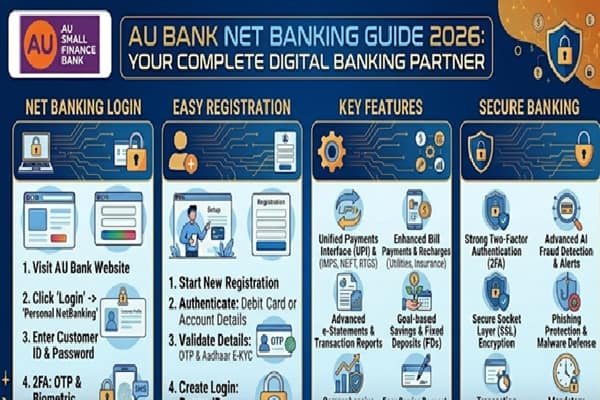
Managing your bank account should feel simple, not stressful. That’s exactly what AU Small Finance Bank tries to deliver with its net banking service. Whether you want to check your balance, transfer money, or download statements, everything is designed to work smoothly without needing to visit a branch.
This guide goes deep into AU Bank net banking. It explains how it works, how to register, how to log in safely, and how to solve common problems. By the end, you will not need to look anywhere else.
What is AU Bank Net Banking and Why It Matters
AU Bank net banking is an online platform that lets customers manage their accounts through a website. You do not need to stand in queues or depend on branch timings.
You can log in anytime and access your account from your phone or computer. This is especially helpful if you handle regular payments, run a small business, or track multiple transactions.
The service connects all your banking needs in one place. You can transfer funds, pay bills, check loans, and even open fixed deposits without filling physical forms.
Key Features That Make AU Net Banking Useful
AU Bank has focused on simplicity. The interface is clean, and the features are easy to understand even for first-time users.
You can instantly check your account balance and view recent transactions. This helps you stay aware of your spending habits.
Fund transfer is one of the most used features. You can send money through NEFT, RTGS, and IMPS depending on urgency. IMPS works instantly, even on holidays.
Bill payments are another major advantage. You can pay electricity bills, mobile recharges, DTH subscriptions, and more directly from your account.
The platform also allows you to download account statements. This is useful for tax filing, loan applications, or personal record keeping.
If you have a fixed deposit or recurring deposit, you can manage it online. You can open new deposits or close existing ones without visiting the bank.
How to Register for AU Bank Net Banking
Getting started is simple, but you need to follow the steps carefully.
First, visit the official AU Bank website. Look for the net banking or login section. You will see an option for new user registration.
You need your customer ID, registered mobile number, and debit card details. These are used to verify your identity.
Once you enter the required details, you will receive an OTP on your registered mobile number. Enter it to proceed.
After verification, you can create your login password. Make sure it is strong but easy for you to remember.
Once this is done, your net banking account becomes active. You can log in immediately.
Step-by-Step Login Process
Logging in is quick once your account is set up.
Go to the official AU Bank net banking page. Enter your customer ID or username.
Next, enter your password. Some users may also need to enter an OTP for added security.
After successful login, you will reach your dashboard. This is where you can access all services like transfers, statements, and bill payments.
Always log out after using net banking, especially on shared devices.
Types of Fund Transfers Available
AU Bank offers multiple transfer options so you can choose based on your needs.
NEFT is suitable for regular transfers. It works in batches throughout the day and is ideal for non-urgent payments.
RTGS is used for high-value transfers. It processes transactions in real time and is often used for large business payments.
IMPS is the fastest option. It works 24 by 7 and transfers money instantly, even at night or on holidays.
Each method has its own limits and charges. IMPS is usually preferred for speed, while NEFT is commonly used for everyday transfers.
How to Add a Beneficiary
Before sending money, you need to add the receiver as a beneficiary.
Go to the fund transfer section and choose add beneficiary. Enter the person’s name, account number, and IFSC code.
After entering the details, confirm them carefully. Any mistake can send money to the wrong account.
You will receive an OTP for verification. Once confirmed, the beneficiary is added.
Some banks have a cooling period before you can transfer funds to a new beneficiary. This is a safety measure.
Bill Payments and Recharge Services
AU Bank net banking lets you handle daily payments without switching apps.
You can pay electricity, water, gas, and broadband bills directly. This saves time and avoids late fees.
Mobile and DTH recharges are also available. You can set reminders or even automate recurring payments.
This feature is especially useful for families managing multiple expenses every month.
Account Statements and Financial Tracking
Keeping track of your finances becomes easier with online statements.
You can download statements for any date range. This helps in budgeting and understanding spending patterns.
Statements are also required when applying for loans or filing income tax returns.
The system stores your transaction history securely, so you can access it whenever needed.
Security Features You Should Know
Online banking is convenient, but security matters.
AU Bank uses encryption to protect your data. This ensures that your information is not exposed to hackers.
OTP verification adds another layer of safety. Even if someone knows your password, they cannot log in without your mobile.
You should also follow basic precautions. Never share your login details with anyone. Avoid using public WiFi for banking.
Change your password regularly. If you notice any suspicious activity, report it immediately.
Common Issues and How to Fix Them
Sometimes users face login or transaction issues. Most of them are easy to solve.
If you forget your password, use the forgot password option. You can reset it using your registered mobile number.
If your account gets locked, wait for some time or contact customer support.
Transaction failures can happen due to network issues. In most cases, the amount gets reversed automatically.
If the issue continues, contacting AU Bank support is the best option.
Benefits for Personal and Business Users
For personal users, net banking saves time and effort. You can manage your money without leaving your home.
For business users, it becomes a powerful tool. You can handle vendor payments, track cash flow, and manage multiple transactions daily.
Small business owners especially benefit from instant transfers and easy record keeping.
Mobile Banking vs Net Banking
AU Bank also offers mobile banking through its app.
Net banking works better on larger screens and is useful for detailed tasks like downloading statements or managing multiple accounts.
Mobile banking is ideal for quick actions like checking balance or making small payments.
Using both together gives you full control over your finances.
Also Read : CSB Net Banking Guide 2026 Login Registration Features and Security
Tips to Use AU Net Banking Efficiently
Set strong passwords and update them regularly.
Check your account activity often to avoid fraud.
Use bookmarks to access the official site quickly and avoid fake links.
Enable SMS and email alerts to stay updated on every transaction.
Keep your registered mobile number active, as it is required for OTP verification.
Why AU Bank Net Banking Stands Out
Many banks offer online services, but AU Bank focuses on simplicity and user experience.
The platform is easy to navigate even for beginners. It does not overwhelm users with complex menus.
Transactions are fast, and the system is reliable. This builds trust over time.
Customer support is also responsive, which helps in resolving issues quickly.
Final Thoughts
AU Bank net banking is more than just a digital tool. It is a complete banking solution that fits into your daily routine.
From sending money to tracking expenses, everything is designed to be quick and simple.
If you are still relying on branch visits for basic tasks, switching to net banking can save you hours every month.
Once you get used to it, managing your finances becomes smoother and more controlled.