
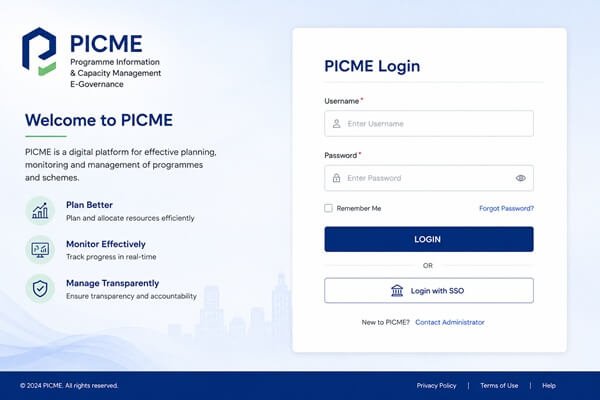
Introduction: Why PICME 3.0 Login Is Suddenly Everywhere?
If you searched for picme 3.0 login, chances are you already know the basics of PICME and just need one thing fixed right now: getting into your account. Maybe the old portal link stopped working. Maybe your RCH ID starts with a number you have never seen before. Maybe your status has been stuck for two weeks and nobody at your Primary Health Centre has explained why.
This guide solves that. It is built specifically around PICME 3.0, the upgraded version of the Tamil Nadu government’s pregnancy tracking system, and it walks through every login path, every registration method, and every fix for the problems that the older guides on this topic simply do not cover.
Most existing articles still reference the old 2019-era portal screenshots and a login flow that has since changed. This guide reflects the current PICME 3.0 system, the new picme3.tn.gov.in address, the 133-prefix RCH ID series, the PICME Parental App, and the 102 call centre option that many mothers do not know exists.
| Quick Answer: To complete your PICME 3.0 login, visit the official portal, click Login in the top right, enter your RCH ID or pre-registration number as your User ID along with your password, complete the captcha, and click Submit. If you do not yet have an RCH ID, you must first complete Pre-registration by Public and wait for Village Health Nurse verification. |
What Is PICME? A Quick Refresher
PICME stands for Pregnancy and Infant Cohort Monitoring and Evaluation. It is a digital system run by the Directorate of Public Health and Preventive Medicine, Government of Tamil Nadu, built to track every pregnant woman in the state from the moment pregnancy is confirmed until the child receives a birth certificate.
Every woman who registers receives a unique 12-digit RCH ID, short for Reproductive and Child Health ID. This number becomes her permanent reference across the entire maternal care journey. It is used by Village Health Nurses to schedule antenatal checkups, by hospitals to process institutional deliveries, and by registrars to issue the child’s birth certificate after delivery.
PICME is not optional paperwork. It is the backbone of how Tamil Nadu delivers maternal healthcare and the Dr. Muthulakshmi Reddy Maternity Benefit Scheme, which provides up to Rs 18,000 in financial assistance across the pregnancy and post-delivery period.
What Changed With PICME 3.0?
PICME 3.0 is the modernised version of the original portal. It was rolled out to fix long-standing complaints: slow loading, confusing navigation, and a registration process that almost entirely depended on visiting a health centre in person. The new system addresses each of these points directly.
New Web Address
The most important practical change is the URL. PICME 3.0 now runs on picme3.tn.gov.in, replacing the earlier picme.tn.gov.in domain that many older blog posts and bookmarks still point to. If your login page looks unfamiliar or throws an error, this is very likely why. Bookmark the new address and discard the old one.
The PICME Parental App
A dedicated mobile app, the PICME Parental App, is now available on the Google Play Store. It offers a bilingual Tamil and English interface and allows self-registration, antenatal care tracking, and immunisation reminders directly from a smartphone, without needing a desktop browser at all.
102 Call Centre Pre-Registration
For women with limited or no internet access, PICME 3.0 introduced telephone-based pre-registration. Dialling the toll-free number 102 connects you to an agent who records your basic details over the phone and starts your application on your behalf.
The New 133-Prefix RCH ID Series
If your newly issued 12-digit RCH ID begins with 133, this is completely normal. It is simply the new numbering series introduced for 2026 registrations under PICME 3.0. This number functions as your permanent digital health record and will follow you through every future interaction with Tamil Nadu’s maternal health system.
PICME 3.0 Login: The Complete Step-by-Step Process
Once you have a pre-registration ID or a confirmed RCH ID, logging in takes less than two minutes. Follow these steps exactly as listed.
- Open your browser and go to the official PICME 3.0 portal at picme3.tn.gov.in
- Locate the Login button, usually positioned in the top-right corner of the homepage
- Enter your User ID. This is either your 12-digit RCH ID (if already issued) or your pre-registration number (if you are still awaiting verification)
- Type the password you created during registration, or the temporary password provided by your Village Health Nurse
- Complete the captcha verification exactly as displayed
- Click Submit to access your dashboard
Once inside, you can view your antenatal care schedule, check vaccination records, download available documents, and track the status of your maternity benefit instalments.
Forgot Your PICME Password? Here Is the Fix
Password resets are common, especially for women who registered months earlier and have not logged in since. The process is straightforward.
- On the login page, click the Forgot Password link below the password field
- Enter your registered mobile number or email address
- You will receive an OTP on your phone or inbox within a minute
- Enter the OTP to verify your identity
- Create a new password and confirm it to complete the reset
If the OTP does not arrive, check that the mobile number on file is the same one that is currently active. A common cause of failed resets is a changed SIM card or number that was never updated in the system.
PICME 3.0 Registration: Three Ways to Get Started
If you do not yet have a login because you have not registered at all, PICME 3.0 gives you three distinct paths. Choose whichever matches your access to technology.
Method 1: Online Self-Registration
- Visit picme3.tn.gov.in and click on Pre-registration by Public
- Enter your personal details, including name, age, and address
- Select your district and the nearest administrative block from the dropdown menus
- Enter your area pin-code so the system can assign your case to the correct local health unit
- Choose your preferred date and time slot for a home or centre visit by the Village Health Nurse
- Enter your mobile number and email address, then click Generate OTP
- Enter the OTP received and click Save to complete pre-registration
You will receive a pre-registration ID by SMS immediately after this step. This number is not your final RCH ID. It is a temporary reference used until the Village Health Nurse completes physical verification.
Method 2: Offline Registration Through Health Workers
If internet access is limited, registration is just as achievable offline. Any of the following options work:
- A Village Health Nurse (VHN) or Urban Health Nurse (UHN) can visit your home or meet you locally to collect details directly
- Visit your nearest Primary Health Centre (PHC) or Urban Primary Health Centre (UPHC) and register on the spot
- Visit a Common Service Centre (CSC) at the village level, where trained staff handle the registration for you
- Most government and several private hospitals offer PICME registration support at the time of your first prenatal visit
- Dial 102 to register entirely over the phone through the toll-free PICME helpline
Method 3: The PICME Parental App
Download the PICME Parental App from the Google Play Store, register using your mobile number, and follow the on-screen instructions to build your profile. The app mirrors the web portal’s functionality and additionally sends automatic reminders for upcoming checkups and immunisations, making it the easiest option for mothers who manage most tasks from a phone.
How to Get Your RCH ID After Registration
Registering and receiving your RCH ID are two separate steps, and this is where the most confusion happens. Here is exactly what occurs between them.
- Complete pre-registration through any of the three methods above
- A Village Health Nurse is assigned to your case and visits to physically verify your identity, address, and pregnancy confirmation documents
- The VHN enters your verified details into the ANMOL (ANM Online) system used by field health workers
- Once verification is approved, your 12-digit RCH ID is generated and sent to you by SMS
- You can then use this RCH ID to log in to the PICME 3.0 portal and access your full profile
This entire process typically takes a few days to a few weeks, depending on how quickly the VHN visit is scheduled in your area.
How to Check Your PICME Application Status Online
If you are still waiting and want to check progress without calling anyone, the status checker is the fastest route.
- Go to picme3.tn.gov.in
- Click on Pre-registration by Public
- Select Pre-registration Application ID Status from the menu
- Enter your 12-digit Pre-registration ID exactly as received by SMS
- Click Submit to view your current status
| Status Shown | What It Means |
| Registered – Awaiting Verification | Your application has been received and is waiting for a VHN visit |
| Verified – RCH ID Generated | Your details are confirmed and your final RCH ID has been issued |
| Pending for Verification (15+ days) | Your local VHN has likely not been assigned or notified yet |
| In Progress | Application is under internal review, no action needed from you |
| Rejected | Submitted information was incorrect or incomplete and needs correction |
Solving the Most Common PICME 3.0 Login and Status Problems
Search forums and comment sections are filled with the same handful of recurring issues. Here is a direct fix for each one.
| Problem | Likely Cause | Fix |
| Login page will not load | Using the old picme.tn.gov.in address | Switch to picme3.tn.gov.in and clear browser cache |
| Invalid RCH ID or User ID error | Typo, extra space, or wrong ID type entered | Re-check the 12-digit number carefully, remove any spaces |
| Password not accepted | Forgotten or mistyped password | Use the Forgot Password link to reset via OTP |
| Status stuck on Pending for 15+ days | VHN has not been assigned in your area | Visit your nearest PHC directly with your pre-registration ID |
| No SMS received after registration | Incorrect or inactive mobile number on file | Visit your VHN or PHC to update your contact number |
| Captcha not working | Browser rendering issue or slow connection | Refresh the page or switch to a different browser |
| Mobile app not syncing | Outdated app version | Update or reinstall the PICME Parental App |
If none of these resolve your issue, the PICME helpline at 102 remains the fastest direct line for unresolved technical problems, and it operates as a toll-free number from any phone.
Eligibility: Who Can Register and Login to PICME
Eligibility is intentionally broad and inclusive. There is no income threshold and no age cutoff beyond the general reproductive age bracket used for tracking.
- Any pregnant woman who is a resident or temporary resident of Tamil Nadu during her pregnancy
- Women who are planning to conceive can pre-register in advance of confirmed pregnancy
- The scheme applies to every pregnancy, including second or subsequent children, not only the first
- A family member or husband can initiate registration on behalf of the pregnant woman if needed
Aadhaar is recommended but not strictly mandatory for basic PICME registration. It becomes effectively necessary, however, when applying for financial assistance under the Dr. Muthulakshmi Reddy Maternity Benefit Scheme, since the bank account used for disbursement must be Aadhaar-linked.
Documents Required for PICME Registration
| Document Type | Accepted Proofs |
| Identity Proof | Aadhaar Card (strongly recommended), Voter ID, Passport, Driving License |
| Address Proof | Ration Card, Bank Passbook, Voter ID, Utility Bill, Rental Agreement |
| Pregnancy Confirmation | Medical confirmation slip or ultrasound scan report |
| Bank Details | Passbook copy, account must be in the mother’s name and Aadhaar-linked for benefit disbursement |
| Photographs | Two to three recent passport-sized photographs |
Dr. Muthulakshmi Reddy Maternity Benefit Scheme: The Full Rs 18,000 Breakdown
PICME registration is the mandatory gateway to this financial assistance scheme. Without an RCH ID, none of the following instalments can be claimed.
| Instalment | Amount | Condition to Claim |
| 1st Instalment | Rs 6,000 | Completing required antenatal checkups before the 4th month of pregnancy |
| Nutrition Kit 1 | Worth Rs 2,000 | Provided during the first trimester |
| 2nd Instalment | Rs 6,000 | 4 months after delivery in a Government or Local Body institution, with the 3rd dose of DPT, Hepatitis, and Polio vaccines completed |
| Nutrition Kit 2 | Worth Rs 2,000 | Provided post-delivery |
| 3rd Instalment | Rs 2,000 | After completing the Measles-Rubella vaccination between the 9th and 12th month of the child |
Together, the cash instalments and nutrition kits add up to Rs 18,000 in total support across the maternity period. An additional early bonus of Rs 2,000 is available to mothers who complete registration and the application within the first 12 weeks of pregnancy and are found eligible, making early registration genuinely worth pursuing rather than delaying.
Also read: GST Portal Login: Complete Step by Step Guide to www.gst.gov.in
Using Your RCH ID to Get a Birth Certificate
One of the most practical reasons PICME registration matters is that it directly determines how smoothly you can obtain your child’s birth certificate after delivery.
- Complete your RCH ID registration well before your expected delivery date
- After delivery, provide your RCH ID to the hospital or registering authority
- The RCH ID allows the registrar to pull your verified maternal record directly, speeding up certificate issuance
- Collect the birth certificate from the relevant municipal or local body office, or have it delivered to your registered address
It remains technically possible to deliver without an RCH ID, but the birth certificate process becomes considerably slower and more document-heavy without it. Registering early removes this friction entirely.
PICME 3.0 vs the Old PICME Portal: What Actually Improved
| Feature | Old PICME Portal | PICME 3.0 |
| Web Address | picme.tn.gov.in | picme3.tn.gov.in |
| Mobile App | Not available | PICME Parental App on Google Play Store |
| Phone Registration | Not supported | Available via toll-free 102 |
| RCH ID Series | Older numbering format | New 133-prefix series for 2026 |
| Status Tracking | Manual follow-up required | Online status checker with clear status labels |
| Login Speed | Frequently slow during peak hours | Improved server response and stability |
Practical Tips for a Smooth PICME 3.0 Experience
- Register within the first 12 weeks of pregnancy to qualify for the early registration bonus and to give the VHN sufficient time for verification before your antenatal schedule begins
- Double-check your mobile number during registration. Almost every downstream issue, from missed OTPs to delayed RCH ID delivery, traces back to an incorrect or inactive number
- Save the picme3.tn.gov.in address as a bookmark immediately so you never accidentally land on the outdated portal
- Keep your pre-registration ID SMS saved, since it is required for both status checks and any in-person follow-up at a PHC
- If your VHN visit has not happened within two weeks of registration, do not wait passively. Visit your nearest Primary Health Centre directly with your pre-registration ID
- Use the PICME Parental App if you are frequently away from a desktop computer. It mirrors all core portal functions and adds appointment reminders
Frequently Asked Questions
What is the correct website for PICME 3.0 login?
The current official portal is picme3.tn.gov.in. The earlier picme.tn.gov.in address belongs to the older system and may not reflect current login functionality.
What do I use as my User ID to login?
Use your 12-digit RCH ID if it has already been issued. If you are still awaiting RCH ID verification, use the pre-registration number sent to you by SMS instead.
Why does my new RCH ID start with 133?
The 133 prefix is simply the new numbering series used for 2026 registrations under PICME 3.0. It does not indicate any error and functions exactly like any other valid RCH ID.
I forgot my PICME password. What should I do?
Click Forgot Password on the login page, enter your registered mobile number or email, verify with the OTP sent to you, and set a new password.
My status has been Pending for Verification for over two weeks. What now?
This typically means a Village Health Nurse has not yet been assigned to your case. Visit your nearest Primary Health Centre with your pre-registration ID to get the verification process restarted directly.
Can I register for PICME without an Aadhaar card?
Yes, Aadhaar is not strictly mandatory for the initial PICME registration. However, it becomes effectively necessary when applying for the Dr. Muthulakshmi Reddy Maternity Benefit Scheme, since the receiving bank account must be Aadhaar-linked.
Is there a mobile app for PICME 3.0?
Yes, the PICME Parental App is available on the Google Play Store. It supports a bilingual Tamil and English interface and allows self-registration, antenatal tracking, and immunisation reminders.
How much financial assistance can I get under this scheme?
Eligible mothers can receive up to Rs 18,000 in total support, made up of three cash instalments of Rs 6,000, Rs 6,000, and Rs 2,000, along with two nutrition kits worth Rs 2,000 each.
Is PICME registration mandatory for a birth certificate in Tamil Nadu?
Yes. While delivery without an RCH ID is technically possible, the birth certificate cannot be issued smoothly without it. The RCH ID is the documentation that links the mother’s verified maternal record to the registrar’s process.
Can I register for PICME by phone if I do not have internet access?
Yes. Dial the toll-free number 102 to reach the PICME call centre, where an agent will record your basic details and begin your pre-registration over the phone.
How long does it take to receive the RCH ID after registration?
Once a Village Health Nurse completes physical verification of your details, the RCH ID is usually generated and sent by SMS within a few days to a few weeks, depending on how quickly the visit is scheduled in your local area.
Conclusion: Complete Your PICME 3.0 Login Today
PICME 3.0 represents a genuine improvement over the original portal: a faster website, a dedicated mobile app, phone-based registration for those without internet access, and a clearer status-tracking system that removes much of the guesswork mothers previously had to deal with.
Whether you are logging in for the first time, resetting a forgotten password, or trying to understand why your status has not moved in two weeks, the steps in this guide reflect the current PICME 3.0 system as it actually works today, not the outdated 2019 screenshots that many older articles still reference.
If you have not yet registered, do it now rather than later. Early registration unlocks the full Rs 18,000 benefit timeline and the additional early bonus, and it gives the Village Health Nurse verification process enough runway to complete smoothly before your antenatal schedule intensifies.
Bookmark picme3.tn.gov.in, keep your pre-registration ID and RCH ID saved somewhere easy to find, and do not hesitate to call 102 if anything along the way gets stuck. The system is built to support you through the entire journey, from the first confirmed pregnancy test to your child’s birth certificate.