
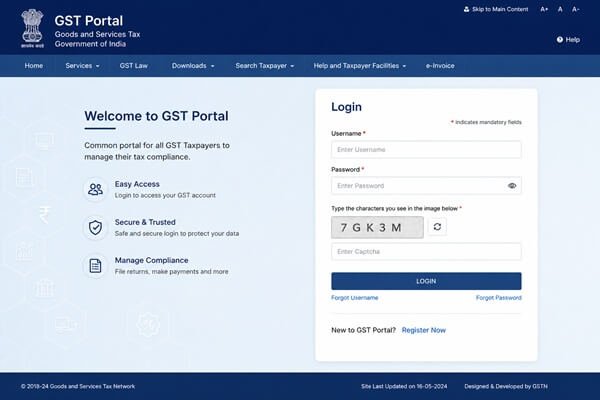
The GST Portal at www.gst.gov.in is the official Government of India website where every registered taxpayer manages Goods and Services Tax compliance—filing returns, paying taxes, tracking refunds, replying to notices, and updating registration details. This guide covers every login scenario in detail: first-time login, regular login, forgotten credentials, common errors, and what to do once you’re in.
What Is the GST Portal?
The GST Portal is the centralised compliance platform managed by the Government of India. Through it, taxpayers and GST practitioners file returns (GSTR-1, GSTR-3B, and others), generate and pay tax challans, track refunds, view ledger balances and tax credits, respond to notices, update profile and bank details, download the registration certificate, and access the e-Way Bill system.
There is a clear distinction between first-time login (using temporary credentials issued after registration) and regular login (using the permanent username and password you create afterward).
How to Login to GST Portal for the First Time
After your GST registration is approved and you receive your GSTIN, you also receive a Provisional ID (or your GSTIN/UIN) and a temporary password via your registered email and mobile. This is used once, to set up permanent credentials.
Steps
- Visit www.gst.gov.in directly.
- Click Login at the top-right corner.
- Click First Time Login.
- Enter your Provisional ID, GSTIN, or UIN.
- Enter the temporary password sent to your email.
- Type the captcha and click Login.
- Create a permanent username (6–15 characters).
- Create a strong password containing uppercase letters, lowercase letters, numbers, and special characters.
- Confirm and submit.
A success message confirms your credentials are created. Use these details for all future logins.
After your first login, the system may prompt you to add bank account details through a non-core amendment application. While optional for TDS/TCS taxpayers, it is recommended for most users.
How to Login as an Existing User
- Visit www.gst.gov.in.
- Click Login.
- Enter your username and password.
- Enter the captcha code.
- Click Login to access your dashboard.
Once logged in, you can access filing status, notices, payments, refunds, registration services, and GST ledgers.
Logging In With TRN or Tracking Status With ARN
If your GST registration is still under processing:
- Go to Services → Registration → New Registration.
- Select Temporary Reference Number (TRN).
- Enter your TRN and captcha.
- Verify using OTP.
To track application status:
- Services → Registration → Track Application Status.
- Select ARN.
- Enter your ARN.
- Click Search.
How to Reset a Forgotten Username
If you forgot your GST username:
- Click Forgot Username.
- Enter your GSTIN or Provisional ID.
- Complete captcha verification.
- Generate OTP.
- Enter OTP received on your registered mobile and email.
- Retrieve your username.
How to Reset a Forgotten Password
GST passwords expire every 120 days.
To reset your password:
- Click Forgot Password.
- Enter your username and captcha.
- Click Generate OTP.
- Enter OTP received on mobile and email.
- Create a new password.
- Confirm and submit.
Your new password cannot match your recent passwords and should meet GST security requirements.
Common Login Problems and Fixes
Forgotten Username or Password
Use the recovery tools instead of repeatedly guessing credentials.
Captcha Not Loading
- Clear browser cache and cookies.
- Disable browser extensions.
- Use Chrome, Firefox, or Edge.
Invalid Username or Password
- Check Caps Lock.
- Use your username instead of GSTIN.
- Reset your password if necessary.
OTP Not Received
- Verify your registered mobile number and email.
- Check network connectivity.
- Contact GST support if details have changed.
Portal Down or Showing Errors
The portal may experience maintenance during peak filing periods. Wait and retry later.
What You Can Do After Logging In
File GST Returns
- GSTR-1
- GSTR-3B
- Annual Returns
Make Payments
Generate challans and pay GST online.
View GST Ledgers
- Electronic Cash Ledger
- Credit Ledger
- Liability Register
Apply for Refunds
Track and manage GST refund applications.
Manage Registration
- Registration amendments
- New registrations
- Cancellation requests
Download GST Certificate
Download Form GST REG-06 directly from the portal.
Access E-Way Bill Services
Generate and manage e-Way Bills for goods transportation.
Security Tips
- Always access the official GST website.
- Use strong passwords.
- Change passwords regularly.
- Never share OTPs.
- Keep mobile number and email updated.
- Logout after every session.
Frequently Asked Questions
What is the official GST portal login website?
The official website is www.gst.gov.in.
Can I login using GSTIN?
Only during first-time login. Existing users must use their username.
How do I retrieve a forgotten username?
Use the Forgot Username option and verify with OTP.
How often does the GST password expire?
Every 120 days.
What if the GST portal does not load?
Clear browser cache, switch browsers, and retry later.
Can I check GST registration status without logging in?
Yes. Use the ARN tracking option under Registration Services.
Is there a GST login helpdesk?
Yes. GST technical support is available through the official GST Helpdesk.
Conclusion
GST Portal login is the gateway to managing GST compliance in India. Whether you are filing returns, paying taxes, tracking refunds, downloading certificates, or updating registration information, understanding the login process ensures smooth access to GST services. By following the steps outlined above and using the troubleshooting tips when needed, taxpayers can avoid common login issues and efficiently manage their GST obligations.